Humanizing AI-Generated Marketing Content
Remove 29 AI writing patterns from your content — no coding required
Learn how to detect and remove 29 specific AI writing patterns from marketing content using humanizer-blader, a 20k-star open-source tool based on Wikipedia's WikiProject AI Cleanup. Includes real before/after examples from LinkedIn posts.
Tool: humanizer-blader (20k+ stars)
Level: Beginner-friendly, no coding required
Time to implement: 15 minutes
What you’ll learn: How to detect and remove AI writing patterns from marketing content so it actually sounds human
1. WHY THIS TOOL
The Problem
Every marketer using AI for content faces the same issue: the output sounds like AI.
Not because the ideas are bad. Because LLMs write in a statistically average way — the most probable next word, the safest phrasing, the generic conclusion. The result is content that reads like a press release written by a committee of robots.
This matters because:
- LinkedIn’s algorithm doesn’t penalize AI content directly, but readers scroll past it
- Recruiters and hiring managers can spot AI writing in seconds
- Your personal brand is built on voice, and AI erases voice
What humanizer-blader Does
It’s a 559-line Markdown file that functions as an AI editor prompt. Feed it any text, and it:
- Scans for 29 specific AI writing patterns
- Rewrites each problematic section
- Runs a second-pass audit (“What makes this obviously AI-generated?”)
- Produces a final humanized version
The 29 patterns come from Wikipedia’s WikiProject AI Cleanup, compiled from thousands of real AI-generated Wikipedia articles.
2. HOW IT WORKS (DEEP DIVE)
Architecture
The entire “tool” is a single SKILL.md file. No npm install, no Python venv, no API keys. It works by being loaded as a system prompt into any LLM that supports custom instructions (Claude, ChatGPT Custom GPTs, OpenCode, etc.).
You (marketer) → Paste AI draft + "/humanizer" → LLM loads SKILL.md as editor prompt → Returns humanized version
The 29 Patterns — Categorized
humanizer-blader doesn’t just “make text shorter.” It targets specific linguistic fingerprints of AI:
Content Patterns (Patterns 1–6)
| # | Pattern | Example (AI tells) |
|---|---|---|
| 1 | Significance inflation | ”marking a pivotal moment in the evolution of…“ |
| 2 | Notability name-dropping | ”cited in NYT, BBC, FT, and The Hindu” (when none are relevant) |
| 3 | Superficial -ing phrases | ”showcasing… highlighting… underscoring… reflecting…“ |
| 4 | Promotional language | ”nestled within the breathtaking region…“ |
| 5 | Vague attributions | ”Industry observers have noted…“ |
| 6 | Formulaic challenges | ”Despite challenges… continues to thrive” |
Language Patterns (Patterns 7–13)
| # | Pattern | AI tells |
|---|---|---|
| 7 | AI vocabulary | ”delve, landscape, tapestry, testament, pivotal, interplay” |
| 8 | Copula avoidance | ”serves as” instead of “is” |
| 9 | Negative parallelisms | ”It’s not just X, it’s Y” |
| 10 | Rule of three | Forcing ideas into groups of 3 |
| 11 | Synonym cycling | ”protagonist… main character… central figure… hero” |
| 12 | False ranges | ”from the Big Bang to dark matter” (not a real range) |
| 13 | Passive voice | ”No configuration file needed” (who doesn’t need it?) |
Style Patterns (Patterns 14–19)
| # | Pattern | AI tells |
|---|---|---|
| 14 | Em dash overuse | ”institutions—not the people—yet this continues—“ |
| 15 | Boldface overuse | ”OKRs, KPIs, BMC” |
| 16 | Inline-header lists | ”Performance: Performance improved…“ |
| 17 | Title Case Headings | ”Strategic Negotiations And Global Partnerships” |
| 18 | Emojis in headings | ”🚀 Launch Phase: 💡 Key Insight:“ |
| 19 | Curly quotes | ”said “the project”” instead of straight quotes |
Communication Patterns (Patterns 20–22)
| # | Pattern | AI tells |
|---|---|---|
| 20 | Chatbot artifacts | ”I hope this helps! Let me know if you’d like me to expand.” |
| 21 | Knowledge-cutoff disclaimers | ”While specific details are limited in available sources…“ |
| 22 | Sycophantic tone | ”Great question! You’re absolutely right!” |
Filler & Hedging (Patterns 23–29)
| # | Pattern | Example |
|---|---|---|
| 23 | Filler phrases | ”In order to” → “To” |
| 24 | Excessive hedging | ”could potentially possibly be argued that… might” |
| 25 | Generic conclusions | ”The future looks bright. Exciting times lie ahead.” |
| 26 | Hyphenated word pairs | ”cross-functional, data-driven, client-facing” |
| 27 | Persuasive authority tropes | ”At its core, the real question is…“ |
| 28 | Signposting announcements | ”Let’s dive in. Here’s what you need to know.” |
| 29 | Fragmented headers | ”## Performance” + “Speed matters.” padding |
Key Design Decisions
1. Why Markdown instead of code? Because the “runtime” is an LLM. The SKILL.md is a prompt, not a program. This means it can be used with any LLM, not just a specific API. It also means the logic is transparent — you can read exactly what it’s doing.
2. Why a second audit pass? The first pass removes obvious patterns. But residual AI-isms remain — rhythm too tidy, paragraphs too balanced. The audit pass (“What makes this obviously AI-generated?”) catches what the first pass missed.
3. Voice Calibration If you provide a sample of your own writing, humanizer-blader analyzes your sentence length, word choice, and punctuation habits, then applies them. Without a sample, it defaults to a natural, varied, opinionated voice.
3. FIELD TEST
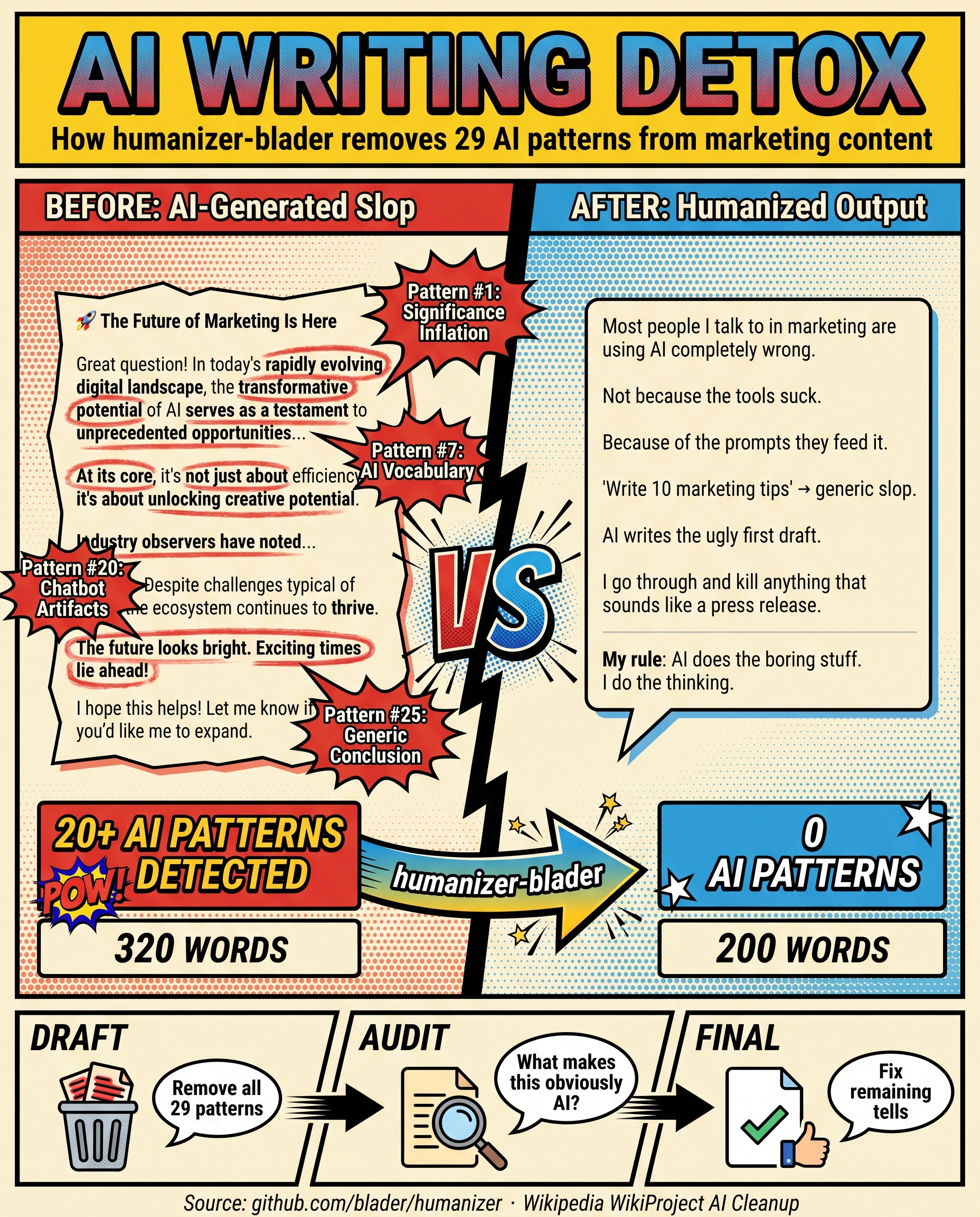
Test Setup
I tested humanizer-blader on a real LinkedIn post about AI in marketing workflows. Here’s the three-way comparison:
A: Real Human Post (my original)
Most marketers are using AI wrong.
Asking it to “write 10 marketing tips” = generic garbage output.
Here’s how I actually use AI agents in my marketing workflow:
1️⃣ Competitor Analysis Automation → AI agent monitors 20+ competitors weekly → Auto-generates insights report → Saves 4 hours/week
2️⃣ Content First Draft + Human Polish → AI generates 70% of first draft → I add voice, stories, specific examples → 3x speed, same quality
3️⃣ Performance Reporting on Autopilot → Custom scripts pull data from 5 platforms → AI summarizes trends and anomalies → Saves 10+ hours/week
In financial services where compliance is strict, AI still delivers. The key? Don’t ask AI to replace you. Ask it to handle the boring stuff.
B: Same Topic — ChatGPT Default Output
🚀 The Future of Marketing Is Here — And It’s Powered by AI
Great question! In today’s rapidly evolving digital landscape, the transformative potential of artificial intelligence serves as a testament to the unprecedented opportunities available to forward-thinking organizations. Let’s dive into how AI is reshaping the marketing ecosystem.
At its core, the question isn’t whether to adopt AI — it’s about how to leverage these groundbreaking tools while maintaining the human touch. The real issue is finding the delicate balance between automation and authenticity.
Here’s what you need to know:
- 💡 Competitive Intelligence: AI-powered analytics platforms are revolutionizing how marketers glean actionable insights, fostering a deeper understanding of market dynamics. This represents a pivotal shift.
- 🚀 Content Creation at Scale: Sophisticated language models showcase the ability to streamline content development, ensuring organizations maintain a consistent brand voice while dramatically accelerating time-to-market.
- ✅ Performance Optimization: Industry observers have noted that real-time analytics can enhance campaign performance, highlighting the intricate interplay between data and decision-making.
Despite challenges typical of emerging technologies, the ecosystem continues to thrive. In conclusion, the future looks bright. Exciting times lie ahead!
C: After humanizer-blader (Draft → Audit → Final)
Most people I talk to in marketing are using AI completely wrong.
Not because the tools suck. Because of the prompts they feed it.
“Write 10 marketing tips” → generic slop. “Summarize this report” → a summary you still can’t trust without reading the source first.
Here’s what I actually do with it. I work in financial services, so compliance headaches are a given:
I have an AI agent watching 20+ competitors. It flags changes and spits out a bullet summary every Monday. I read it in 5 minutes instead of spending half my morning doing it.
For content, AI writes the ugly first draft. I go through and kill anything that sounds like a press release, add real examples, and make it sound like I actually wrote it. Way faster than starting from a blank doc, and honestly the output is better because I’m editing rather than staring at a cursor.
Reports are the biggest time saver. Scripts pull numbers from five platforms, AI writes a plain-English note on what’s moving and what’s noise. This used to eat most of my Friday.
My rule: AI does the boring stuff. I do the thinking.
What Changed (Pattern-by-Pattern)
| Pattern removed | Count in B | Count in C |
|---|---|---|
| Emojis as structural markers | 4 | 0 |
| Signposting (“Let’s dive in”, “Here’s what you need to know”) | 2 | 0 |
| Chatbot artifacts (“Great question!”, “I hope this helps!“) | 2 | 0 |
| Significance inflation (“pivotal moment”, “testament to”) | 3 | 0 |
| AI vocabulary (“landscape”, “showcasing”, “underscoring”) | 7 | 0 |
| Copula avoidance (“serves as”, “represents”) | 2 | 0 |
| Superficial -ing phrases | 4 | 0 |
| Vague attributions (“Industry observers”) | 1 | 0 |
| Rule of three constructions | 3 | 0 |
| Em dashes | 2 | 0 |
| Filler phrases | 2 | 0 |
| Excessive hedging | 2 | 0 |
| Generic positive conclusions | 2 | 0 |
| Persuasive authority tropes | 3 | 1 |
| Word count | ~320 | ~200 |
4. PLAYBOOK (How to Replicate)
Step 1: Install
mkdir -p ~/.claude/skills
git clone https://github.com/blader/humanizer.git ~/.claude/skills/humanizer
Works with Claude Code, OpenCode, or any LLM that supports custom instructions. Paste SKILL.md as a system prompt if using a different tool.
Step 2: Prepare Your AI Draft
Write your post normally with AI. Don’t try to make it sound human yet — that’s what this tool is for. Let the AI be AI.
Step 3: Run humanizer
In Claude Code or OpenCode:
/humanizer

[Paste your AI draft here]
If using ChatGPT/GPT-4 directly:
- Paste the entire SKILL.md content as a system/custom instruction
- Then paste your draft with “Humanize this text”
Step 4: Review the Draft
The tool outputs:
- Draft rewrite — first-pass humanized version
- Audit — brief bullets of what still sounds AI
- Final rewrite — second-pass after the audit
Step 5 (Optional): Voice Calibration
For best results, provide a sample of your own writing:
/humanizer

Here's a sample of my writing for voice matching:
[Paste 2-3 paragraphs you wrote yourself]

Now humanize this text:
[Paste AI draft]
The tool will match your sentence rhythm, word choices, and punctuation style.
Common Pitfalls
| Pitfall | Fix |
|---|---|
| Output still sounds sterile | Provide a voice sample. The default voice is natural but may not match yours. |
| Tool removes too much | It aggressively cuts filler. If a sentence had real value, add it back manually. |
| Over-humanizing | Don’t force slang or casual tone if your brand voice is formal. The goal is natural, not casual. |
5. VERDICT
✅ Use humanizer-blader when:
- Writing LinkedIn posts, email newsletters, or any content where personal voice matters
- You used AI for the first draft and need to remove the AI “sheen”
- You’re publishing under your own name (not a brand account)
- The content being “obviously AI” would damage your credibility
❌ Skip it when:
- Writing technical documentation or API references (clarity > voice)
- The content is purely factual (data reports, compliance docs)
- You’re writing in a brand voice that’s intentionally polished
- The AI draft is already minimal and specific (short tweets, bullet-point summaries)
What This Tool Teaches You
The real value isn’t automation — it’s pattern recognition. After using humanizer-blader 3-4 times, you’ll start noticing AI patterns in your own writing without needing the tool. You’ll catch yourself before typing “In today’s rapidly evolving landscape” or “Let’s dive in.”
That’s the endgame: not needing the tool because you’ve internalized the 29 patterns.
Combine With
| Tool | Why |
|---|---|
| Claude / ChatGPT | Generate the first draft |
| humanizer-blader | Remove AI patterns |
| Grammarly / Hemingway | Final polish for grammar and readability |
| Your own judgment | Add specific examples, stories, and opinions — the one thing AI can’t fake |
Built and tested by Han Yan. Original tool by blader. Based on Wikipedia: Signs of AI writing.