Creating AI Knowledge Comics for Marketing
A 4-provider comparison: Google, OpenAI, Seedream, and MiniMax for marketing comics
Learn which AI image generation API produces the best knowledge comics for marketing content. Real 4-provider comparison with the same prompt — Google Gemini, OpenAI GPT Image 2, Seedream 5.0, and MiniMax image-01 tested side by side.
Tool: baoyu-comic (by 宝玉)
Level: Low-code, requires image generation API keys
Time per page: ~2-5 minutes depending on provider
What you’ll learn: Which AI image API actually works for marketing comics — and which ones don’t
1. WHY THIS TOOL
The Problem
Marketing content is drowning in text. LinkedIn carousels, blog headers, social posts — most marketers default to stock photos or generic infographics because “I’m not a designer.”
But knowledge comics — educational comics that explain concepts visually — consistently outperform text-only content. They’re scannable, memorable, and stand out in feeds full of talking-head photos.
The catch: hiring a comic artist for every marketing piece isn’t realistic.
What baoyu-comic Does
baoyu-comic is a knowledge comic generator built by Chinese developer 宝玉 (JimLiu). It’s not a standalone app — it’s a workflow engine that:
- Analyzes your content and breaks it into comic panels
- Designs a storyboard with character definitions and visual metaphors
- Writes per-panel image generation prompts
- Calls an image generation API (you pick which one) to render each page
The result: a complete knowledge comic from a single text prompt or article.
6 art styles × 7 tones × 5 presets — you control the visual language. From manga to ink-brush, from warm and educational to dramatic and action-packed.
2. HOW IT WORKS (DEEP DIVE)
Architecture
Your content → Storyboard → Character definitions → Panel prompts → Image API → Comic pages
The 6 Art Styles
| Style | Best for |
|---|---|
ligne-claire | Clean, professional, educational — like Tintin or Logicomix |
manga | Japanese comic aesthetic, expressive characters |
realistic | Photorealistic panels, cinematic feel |
ink-brush | Chinese/Japanese brush painting, atmospheric |
chalk | Chalkboard diagrams, informal/educational |
minimalist | Simple line art, stick figures, B&W |
The 5 Presets
| Preset | Combination | Hook |
|---|---|---|
ohmsha | manga + neutral | Visual metaphors, no talking heads, gadget reveals |
wuxia | ink-brush + action | Qi effects, combat visuals, atmospheric |
shoujo | manga + romantic | Decorative elements, eye details |
concept-story | manga + warm | Visual symbol system, growth arc |
four-panel | minimalist + neutral | B&W + spot color, 起承转合 structure |
Key Design Decisions
1. Why 7 steps? baoyu-comic doesn’t just throw a prompt at an image API and hope for the best. It force-structures the creative process: analyze → storyboard → character definitions → prompts → render. Each step is saved as a file, so you can tweak any part of the pipeline and regenerate without starting over.
2. Why character sheets? For multi-page comics, baoyu-comic generates a character reference sheet first, then embeds character descriptions into every page prompt. This is the secret to character consistency across panels — something no single-prompt approach can achieve.
3. Image API is pluggable
baoyu-comic doesn’t include an image generator. It uses baoyu-imagine underneath, which supports Google Gemini, OpenAI GPT Image 2, Seedream, MiniMax, DashScope, and more. This means you can swap providers based on your needs — and this playbook’s entire point is helping you pick the right one.
3. FIELD TEST: 4-Provider Comic Comparison
Test Setup
Content: A marketer’s workflow transformation with AI — 4 panels showing before/after. Prompt: Same for all providers. 4-panel manga layout with speech bubbles, clock times, and captions. Providers tested: Google Gemini, OpenAI GPT Image 2, Seedream 5.0, MiniMax image-01.
Results
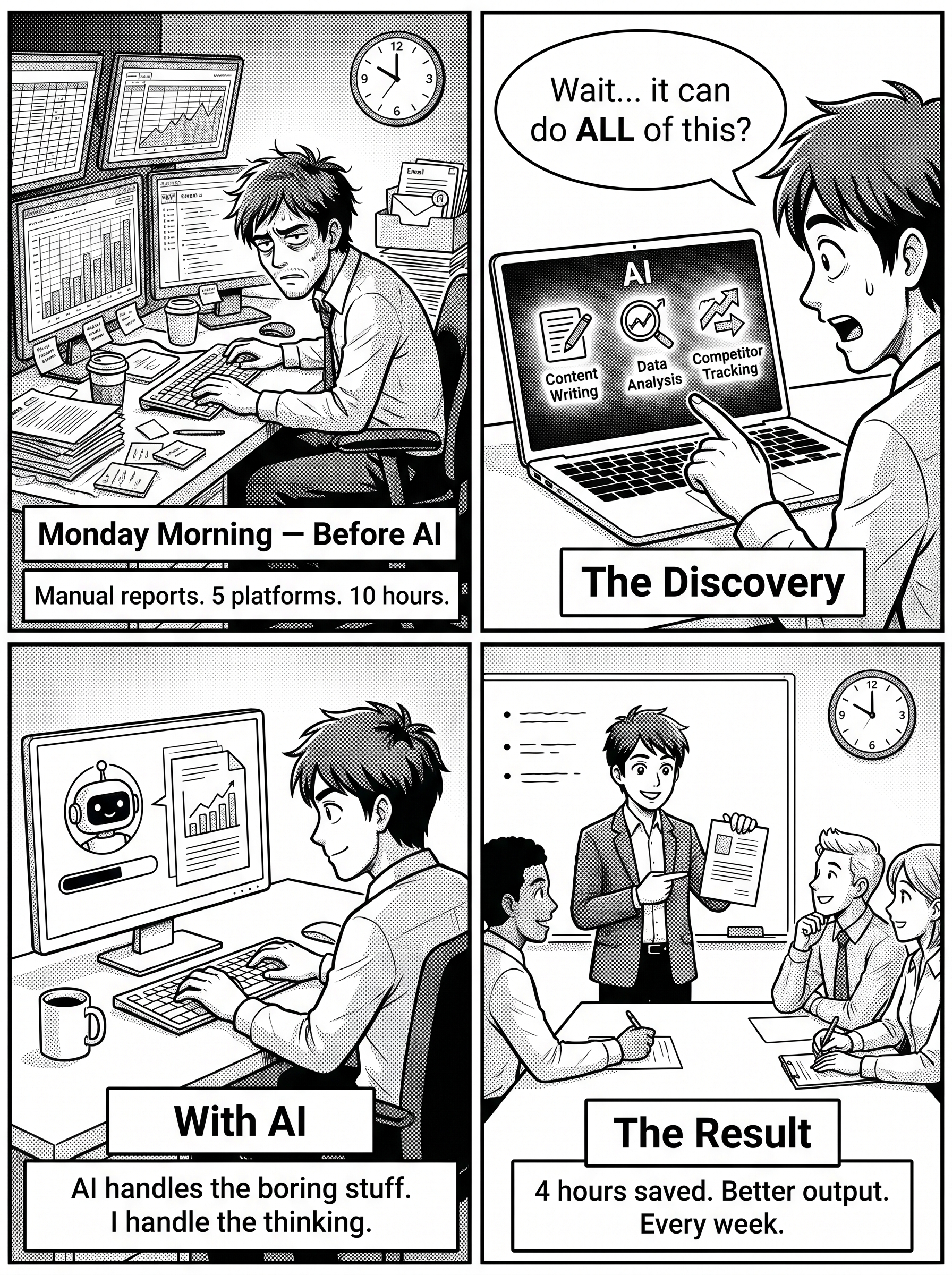 Google Gemini — 3.7MB, ~1 min
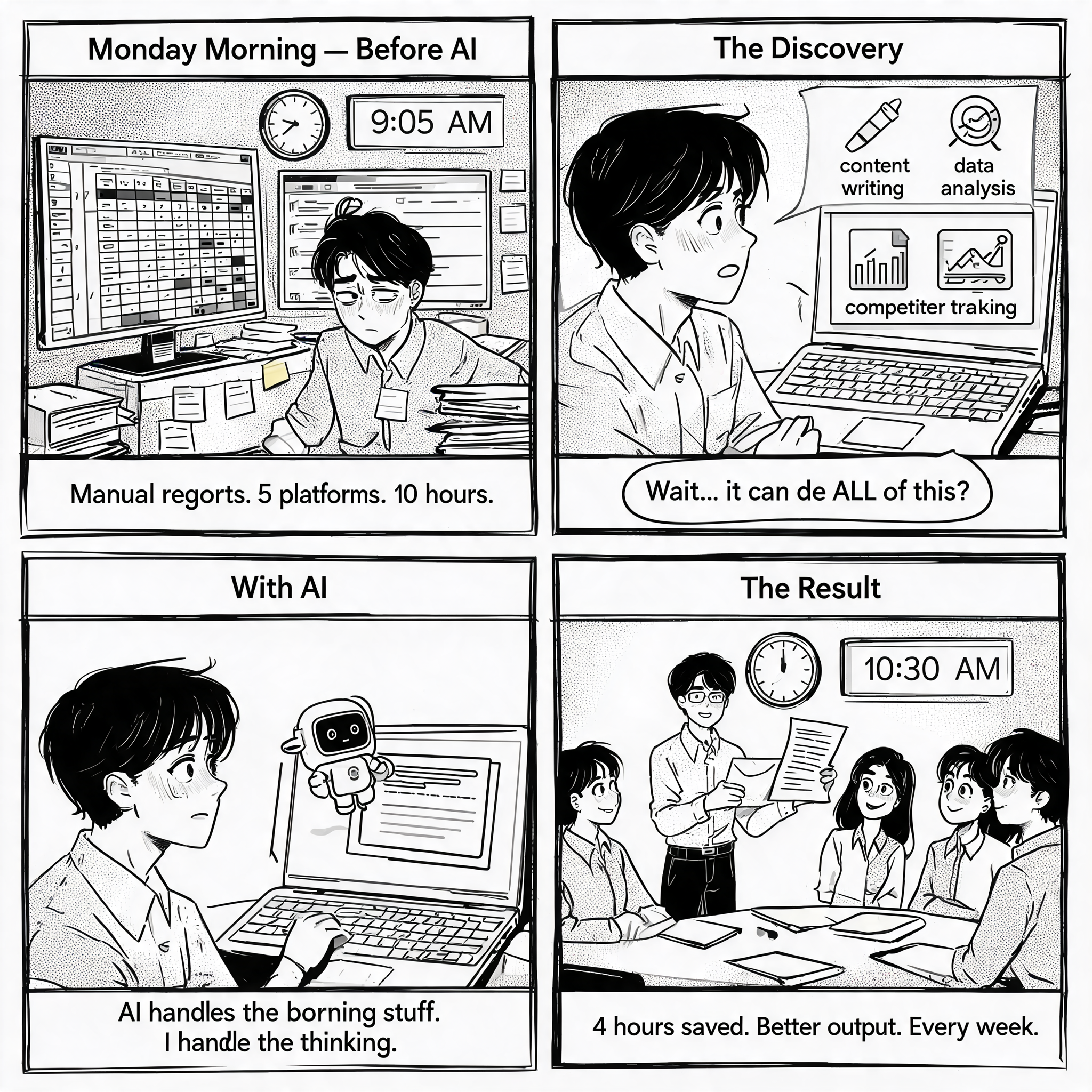 Seedream 5.0 — 5.6MB, ~1 min
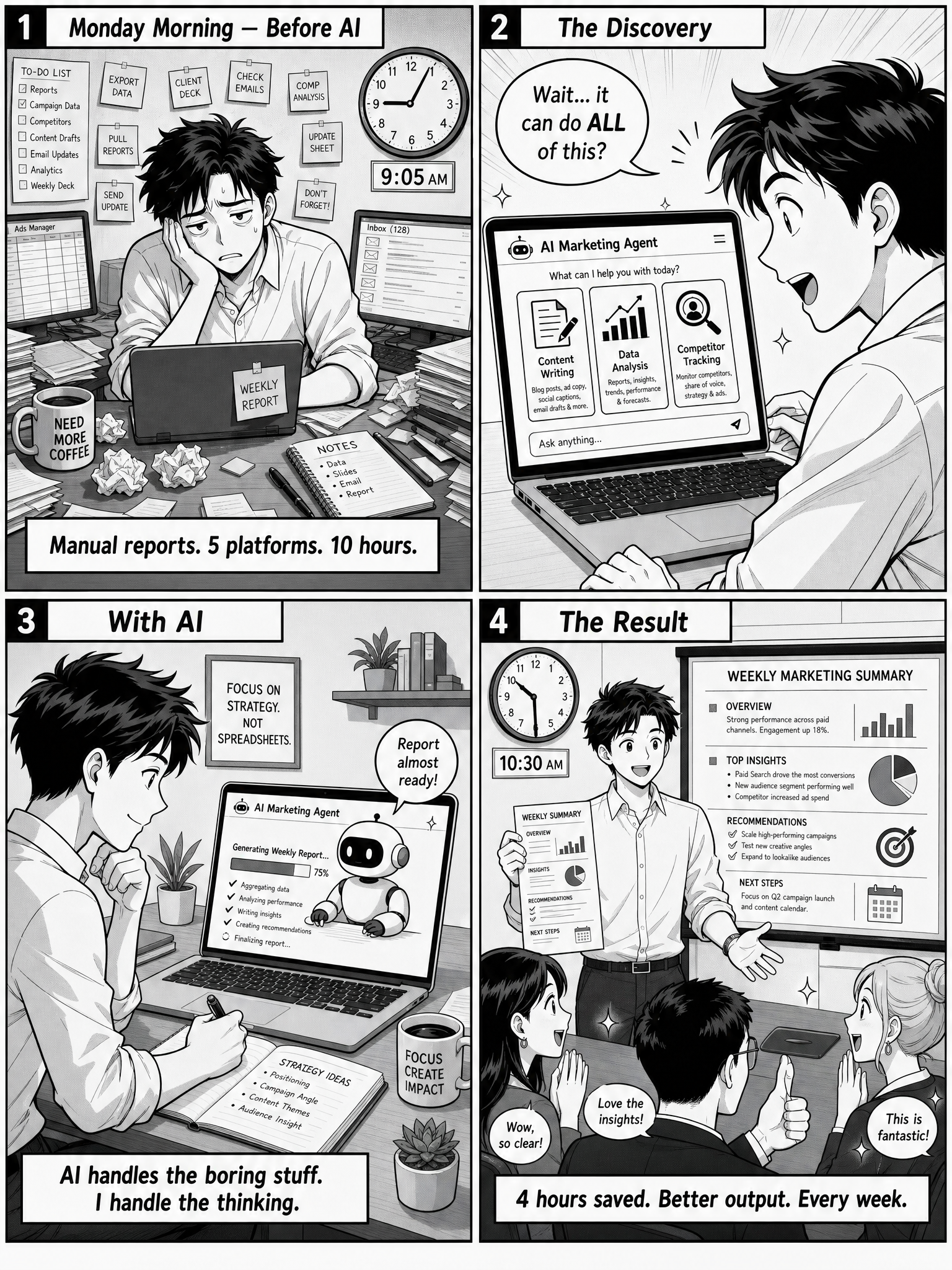 OpenAI GPT Image 2 — 5.6MB, ~2 min
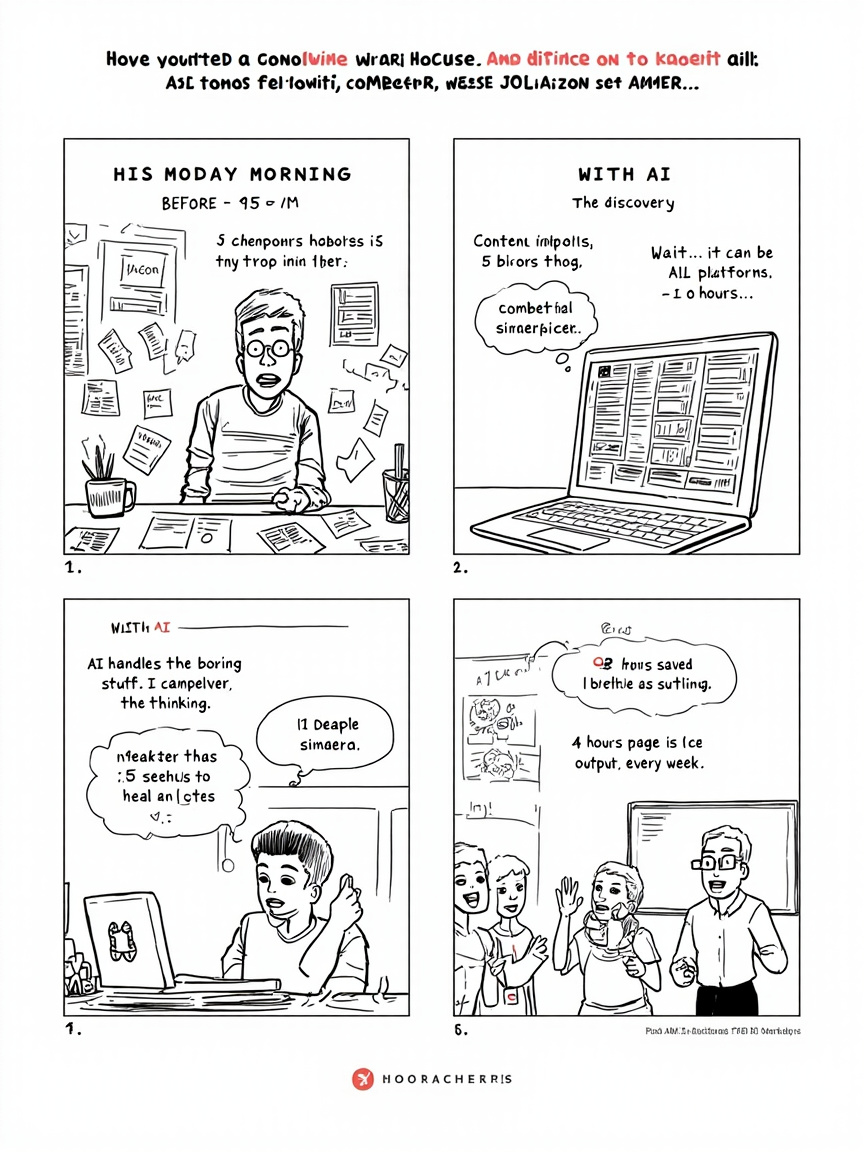 MiniMax image-01 — 333KB, ~30 sec
Head-to-Head Comparison
| Dimension | Google Gemini | OpenAI GPT Image 2 | Seedream 5.0 | MiniMax image-01 |
|---|---|---|---|---|
| Text readability | ⚠️ Some garbled text | ✅ Clean, readable | ✅ Clean, readable | ❌ Completely unreadable |
| 4-panel understanding | ✅ Correct layout | ✅ Correct layout | ✅ Correct layout | ⚠️ Simplified layout |
| Prompt detail accuracy | ❌ Clock times wrong | ✅ 9:05 AM → 10:30 AM | ❌ Clock times generic | ❌ No clock visible |
| Art style fidelity | Good | Good | Best (Asian comic aesthetic) | Poor (overly realistic) |
| Character consistency | Good | Best | Good | N/A (one character) |
| File size | 3.7 MB | 5.6 MB | 5.6 MB | 333 KB |
| Generation speed | ~1 min | ~2 min | ~1 min | ~30 sec |
| Recommended for comics? | ⚠️ Situational | ✅ Best overall | ✅ Best Asian style | ❌ Not recommended |
The Clock Detail
Only OpenAI GPT Image 2 correctly rendered the clock times from the prompt:
- Panel 1: 9:05 AM (the marketer’s chaotic Monday morning)
- Panel 4: 10:30 AM (after AI transformed the workflow)
Google and Seedream both drew clocks, but with generic times. MiniMax didn’t render a clock at all. This isn’t a trivial detail — it demonstrates which model actually reads and follows specific prompt instructions versus generating a generic “comic about a marketer.”
Winner
OpenAI GPT Image 2 wins for text-heavy marketing comics. It’s the only provider that reliably renders readable English text in speech bubbles AND follows specific prompt details. The downside: it’s the slowest, at roughly 2 minutes per page.
Seedream 5.0 is the runner-up and the best choice if you want an Asian comic aesthetic (manga/manhwa style). Text is clean, style is authentic.
Google Gemini works for simpler comics without heavy text. Good speed, decent quality, but text rendering is unpredictable.
MiniMax image-01 is NOT suitable for comics. Its text rendering is broken, and it only supports one model. Fine for photorealistic images, but not for content with dialogue.
4. PLAYBOOK (How to Replicate)
Prerequisites
# baoyu-comic and baoyu-imagine are Hermes skills — already available
# You need at least one image API key:

# OpenAI (recommended for comics)
export OPENAI_API_KEY="sk-..."

# OR Seedream for Asian art style
export ARK_API_KEY="ark-..."

# OR Google Gemini
export GOOGLE_API_KEY="..."
Step 1: Choose Your Art Style + Tone
Start simple. For marketing content, these combinations work well:
| Content type | Art + Tone | Preset |
|---|---|---|
| Educational tutorial | manga + neutral | ohmsha |
| Case study / story | ligne-claire + warm | — |
| Quick social post | minimalist + neutral + four-panel layout | four-panel |
| Product announcement | manga + energetic | — |
Step 2: Write Your Content
baoyu-comic works from any text source — an article, a LinkedIn post draft, or a raw brief. The key: each major point becomes a panel.
Example input:
"The old way: manual reports from 5 platforms, 10 hours/week.
Then I discovered AI agents for competitor tracking, content drafting, and reporting.
Now: AI handles data, I handle strategy. 4 hours saved weekly."
→ This becomes a 4-panel comic.
Step 3: Run the Comic Workflow
baoyu-comic has a 7-step pipeline. For a first test, use the fast path:
- Paste your content
- Confirm art style + tone
- Generate storyboard
- Skip review (for first test)
- Generate prompts
- Skip prompt review (for first test)
- Generate images
Step 4: Pick Your Provider Based on This Chart
| Your need | Use |
|---|---|
| Text-heavy comic with speech bubbles | OpenAI GPT Image 2 |
| Asian manga/manhwa aesthetic | Seedream 5.0 |
| Quick drafts, simple panels | Google Gemini |
| Realistic/cinematic style | Google or OpenAI |
| Never for comics | MiniMax image-01 |
Common Pitfalls
| Pitfall | Fix |
|---|---|
| Speech bubble text is garbled | Switch to OpenAI (best text rendering) |
| Characters look different across panels | Enable character sheet generation (Step 7.1) |
| Clock/times/dates wrong | Only OpenAI follows specific prompt details — use it |
| Generation takes too long | Drop quality from 2K to normal, or use Seedream |
| MiniMax key doesn’t work | MiniMax API has two endpoints: China (api.minimaxi.com) and Global (api.minimax.io). Keys from the Global console need MINIMAX_BASE_URL=https://api.minimax.io |
Provider registration gotcha: Seedream requires a Volcano Engine ARK account on volcengine.com (Chinese console), NOT byteplus.com (international). The international BytePlus console uses HMAC signing which isn’t supported by the CLI tool. You’ll need a Chinese phone number for registration.
5. VERDICT
✅ Use baoyu-comic when:
- You want to explain a concept visually instead of writing another text post
- You’re creating educational content (tutorials, case studies, “how it works”)
- You want to stand out in feeds dominated by stock photos and text-only posts
- You have a clear narrative arc (before/after, problem/solution, journey)
❌ Skip it when:
- You need a single hero image (use baoyu-infographic instead)
- The content doesn’t have a narrative structure
- You’re in a rush (a 4-panel comic takes ~10-15 minutes total with reviews)
- You don’t have an OpenAI API key (text rendering on other providers is unreliable)
The Bigger Lesson
This test revealed something important about the AI tool ecosystem: the API you pick matters more than the prompt you write.
All four providers got the same prompt. The results ranged from “publishable” (OpenAI) to “completely unusable” (MiniMax). The marketer who picks an API at random is gambling. The marketer who understands provider strengths can make intentional choices.
That’s the real value of tools like baoyu-comic — not automation, but informed production. You’re not just “using AI.” You’re choosing the right AI for the job.
Combine With
| Tool | Why |
|---|---|
| baoyu-comic | Comic workflow engine |
| OpenAI GPT Image 2 | Best text rendering for speech bubbles |
| Seedream 5.0 | Best Asian comic aesthetic |
| humanizer-blader | De-AI the text inside speech bubbles before generating |
| baoyu-infographic | For non-narrative visual content (data, comparisons) |
Built and tested by Han Yan. baoyu-comic by 宝玉 (JimLiu).